Renders versus reality: how to read a developer's project visuals
What developer renders and marketing images actually show, what they do not, and how to check a project's floor plan and sales agreement before treating a visual as a promise.
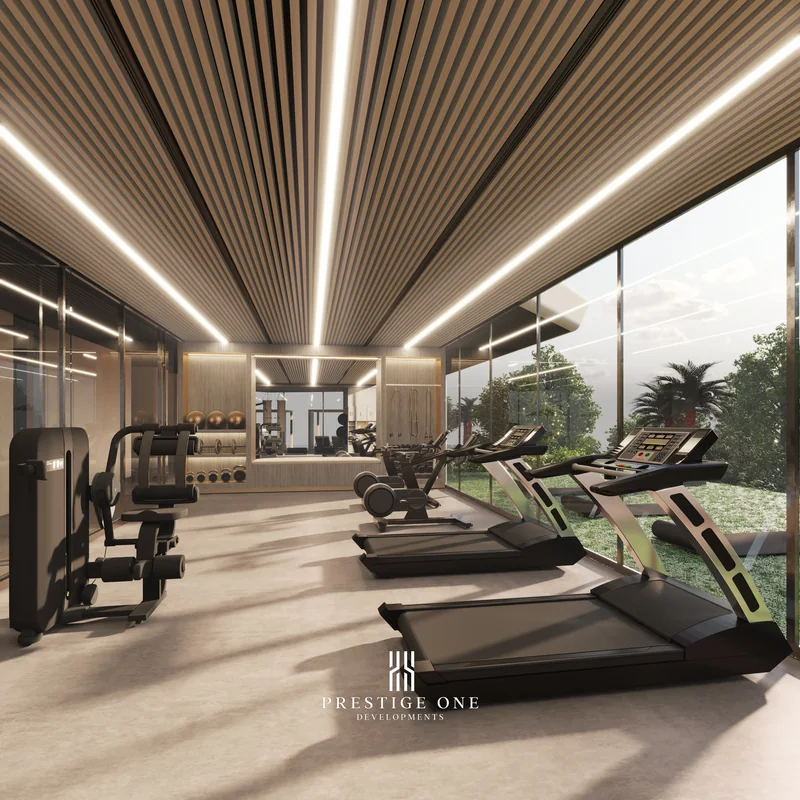
A render is a design intent, not a delivery specification
Every off-plan project is sold largely through images: computer-generated renders of the finished building, the amenity deck, the lobby, and often a specific unit's interior. These images are, without exception, developer visualisations, not photographs of a completed building, since the building does not exist yet. That alone does not make them misleading; it makes them a starting point that needs to be checked against the two documents that actually bind the transaction, the floor plan and the sales and purchase agreement.
What a render is designed to show
A render communicates the architectural and design intent for a space: the general proportions of a lobby, the layout of a pool deck, the mood of an interior. Developers commission these images to help a buyer visualise a finished project years before construction completes, and most are produced to a genuinely high standard reflecting the design the developer intends to build. The image is a design tool, not a warranty of every visible detail.
What a render typically does not confirm
- Exact finishes and fittings for your specific unit. A marketing image may show an upgraded or staged interior that differs from the standard specification for the unit you are buying.
- Furniture and styling. Furniture shown in a render or a show unit is almost never included in the price unless explicitly stated in your sales offer.
- Lighting conditions and surrounding context. Renders are produced under ideal lighting and often omit neighbouring construction or infrastructure that will exist at handover.
- Scale relative to your actual unit. A wide-angle render of an interior can make a space appear larger than the floor plan's measurements indicate.
Two documents to check against every image
| Document | What it confirms instead |
|---|---|
| The floor plan | Exact room dimensions, layout, and orientation for your specific unit |
| The sales and purchase agreement (SPA) | The specification actually included in your purchase, and what counts as a variation |
Read understanding floor plans and unit types in Dubai for how to read a floor plan against a render of the same unit type, and what is a SPA (sales and purchase agreement) in Dubai for what the SPA actually specifies about finishes and fittings.
ORVEN PROPERTIES
Talk to an Orven adviser
Leave your number: an adviser calls you back or replies on WhatsApp, in your language. No commitment.
A practical method for reviewing project visuals
- Separate community-level renders from unit-level renders. A render of the pool deck or lobby reflects shared amenities; a render of an interior reflects one specific layout, which may not be your unit's.
- Ask which unit or floor a render or show unit represents, and whether your specific unit shares that exact layout and orientation.
- Cross-check any specification shown in a render, such as flooring type or kitchen fittings, against the SPA's own description, rather than assuming the image is contractual.
- Ask your adviser to flag anything staged or upgraded in a show unit that is not part of the standard specification.
Reading a developer's brochure alongside the visuals
A brochure combines renders with descriptive text about the project's amenities and positioning. Read how to read a developer brochure in Dubai for how to separate marketing language from the specific, confirmed facts within it, a skill that applies equally to the visuals themselves.
Why this matters more for a remote buyer
A buyer who visits a physical show unit still relies partly on renders for anything not built yet, such as amenity spaces. A buyer purchasing entirely remotely relies on visuals even more heavily, which makes the habit of checking every image against the floor plan and the SPA more important, not less. None of the projects in the Orven selection use imagery from developers outside the authorised set; every visual you see through Orven is the developer's own official visualisation, disclosed as such.
Verifying a specific project's visuals with Orven
If a render raises a question about a specific unit, finish, or amenity, send the project name and the image in question on WhatsApp at +971 52 776 1939, or write to sales@orvenproperties.com. An adviser will confirm what the SPA and floor plan actually specify for that element before you rely on the image alone.
FAQ
Are developer renders accurate representations of the finished building? They reflect the developer's genuine design intent, but exact finishes, furniture and scale should always be confirmed against the floor plan and the SPA rather than the image alone.
Is furniture shown in a render or show unit included in the price? Almost never, unless explicitly stated in your sales offer. Confirm this in writing before assuming a staged interior comes with the unit.
How can I tell if a render represents my specific unit? Ask your adviser which floor, orientation and layout the image represents, and compare it against the floor plan for the unit you are buying.
Should I trust a show unit more than a render? A show unit shows real finish quality, but it can still be staged or upgraded beyond the standard specification. Ask what differs from your specific unit's contract.
What document actually confirms what I am buying, if not the images? The sales and purchase agreement and the floor plan for your specific unit are the binding references, not the marketing visuals.
ORVEN PROPERTIES
Talk to an Orven adviser
Leave your number: an adviser calls you back or replies on WhatsApp, in your language. No commitment.
Frequently asked questions
Are developer renders accurate representations of the finished building?
They reflect the developer's genuine design intent, but exact finishes, furniture and scale should always be confirmed against the floor plan and the SPA rather than the image alone.
Is furniture shown in a render or show unit included in the price?
Almost never, unless explicitly stated in your sales offer. Confirm this in writing before assuming a staged interior comes with the unit.
How can I tell if a render represents my specific unit?
Ask your adviser which floor, orientation and layout the image represents, and compare it against the floor plan for the unit you are buying.
Should I trust a show unit more than a render?
A show unit shows real finish quality, but it can still be staged or upgraded beyond the standard specification. Ask what differs from your specific unit's contract.
What document actually confirms what I am buying, if not the images?
The sales and purchase agreement and the floor plan for your specific unit are the binding references, not the marketing visuals.
Continue reading

Guides
Buying an apartment in Batumi as a Russian citizen
Georgian rules for a foreign buyer, NAPR registration and the role of a local lawyer: what a Russian citizen needs to know before buying an apartment in Batumi, including any checks specific to nationality.
Read the guide →
Guides
Buying off-plan in Dubai remotely from Moscow or Saint Petersburg
A step-by-step look at buying an off-plan unit in Dubai without travelling from Moscow or Saint Petersburg: power of attorney, video calls, escrow payments and the compliance checks that apply throughout.
Read the guide →
Guides
Buying Property in Dubai from Israel: What to Know
Freehold ownership, DLD registration, escrow-protected payments and remote steps for an Israeli resident buying in Dubai, set out without any diplomatic commentary.
Read the guide →
Guides
Buying Property in Batumi from Israel: A Step-by-Step Guide
How an Israeli buyer moves from choosing a Batumi project to a registered title, working with Orven and a local Georgian lawyer at each stage, without describing any flight route or schedule.
Read the guide →INVESTOR GUIDES